How to Create a Stamp (Dojang) Image Online — Personal & Corporate Seals, Free Transparent PNG
Jun 21, 2026
In Korea, a personal name seal called a dojang (도장) — or inkan in Japanese contexts — functions similarly to a handwritten signature and appears on contracts, official forms, and company documents. When you need to add a stamp image to a digital document, the traditional approach of inking a physical seal, pressing it onto paper, and scanning it is a hassle. Worse, scanned stamps come with a white rectangular background that leaves an ugly box when you place them on top of text or tables. This guide explains how to generate a stamp image instantly just by entering a name — with a transparent background — as a PNG you can use on any digital document. No physical seal, no scanner, no installation, no account needed.
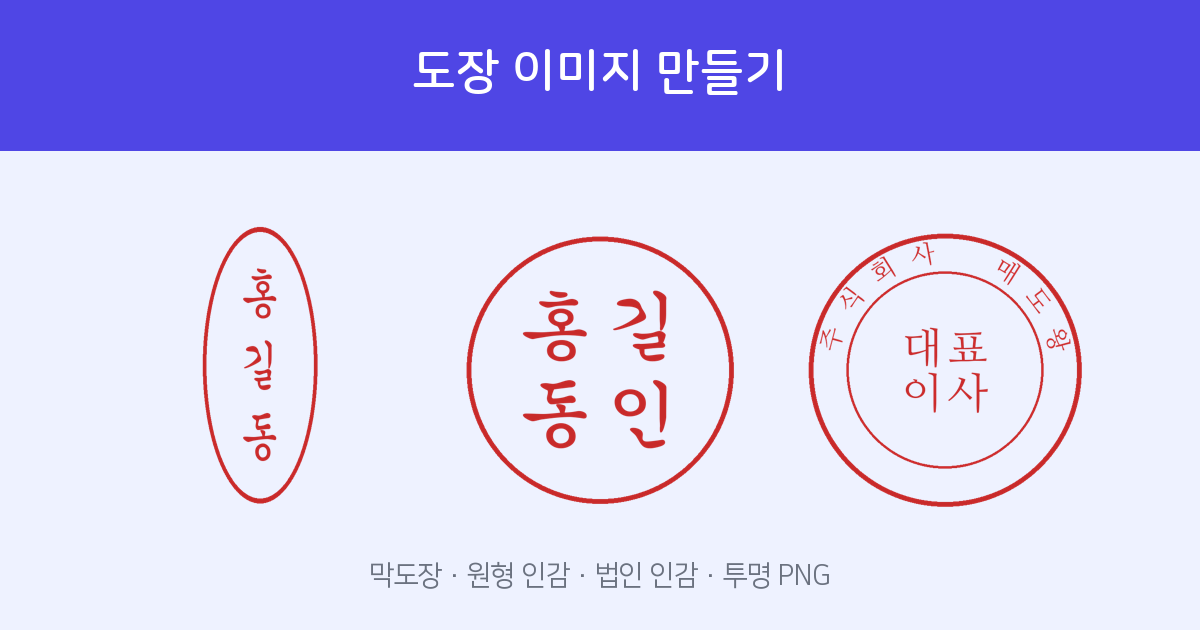
Enter a name → choose style and font → download as transparent PNG. Free — no install, no account.
Create Stamp →Four stamp styles available
- Personal name stamp (vertical) — The most common style: the name written vertically, used for everyday documents and approvals.
- Round inkan (원형 인감) — A circular border enclosing the name with the character 印 (seal). A more formal look when a traditional inkan feel is needed.
- Square seal (사각 인장) — The name fills a rectangular border in a bold, solid style — similar to a signature seal or chop.
- Corporate seal (법인 인감) — Company name around the border (e.g., "○○ Co., Ltd.") with "Representative Director" (or the hanja 代表理事) in the centre. Used for company documents.
You can choose from fonts traditional to Korean seal-carving — including seal script (전서체) and classic calligraphic styles (궁서체) — to match the feel of your document, from clean and understated to bold and formal.
How to make one — 3 steps
- Choose a style — Open Stamp Maker and select personal name stamp, round, square, or corporate.
- Enter a name and pick a font — Type the name (or company name and title for a corporate seal) and watch the preview update in real time. Switch fonts until you find the look you want.
- Download as transparent PNG — Save the stamp with a fully transparent background. Place it on any document or image — no white box, no cropping needed.
Transparent background — drops cleanly onto any document
The key feature is the transparent background. Place the PNG on top of a Word document, a Hangul (HWP) file, or any image editor and only the stamp shape shows — no white rectangle around it. There is nothing to cut out or mask.
Use directly inside FreeSign e-signature
You don't even need to prepare the stamp in advance. When you receive a signature request through FreeSign, you can create a stamp on the spot directly from the stamp field and apply it right there. You can also upload a PNG you already made.
For official legal procedures in Korea that require a certified inkan — such as real-estate registration or submissions to government offices — you still need a physical seal registered with your local government office (구청/동사무소). The stamp images created here are visual representations for use on digital documents and internal paperwork, not legally certified seals.
Related tools
Once you have added your stamp to a contract, you can send it to the other party for their signature using FreeSign e-signature — request and countersign in one flow.
Personal name stamp to corporate seal, as transparent PNG. Free — no install, no account.
Create Stamp Now →Frequently asked questions
Q. Is the background really transparent?
Yes. The PNG is exported with a fully transparent background, so only the stamp shape appears when you place it on a document — no white box around it.
Q. Can I create a corporate seal too?
Yes. You can generate a corporate seal with the company name around the border and "Representative Director" (or the hanja 代表理事) in the centre.
Q. Is this the same as a legally certified Korean inkan?
No. This is a visual stamp image. It is separate from a certified inkan (인감도장) registered with a government office. For procedures that require certified inkan documentation, you must use a registered physical seal.
Q. Is it free?
Yes. No installation, no account, and no charge.